From Film Contact Sheets to Camera Rolls: How to Choose Your Photos
See how film contact sheets and phone camera rolls shape photo selection, then choose a review method that helps you keep the images with a clear purpose.
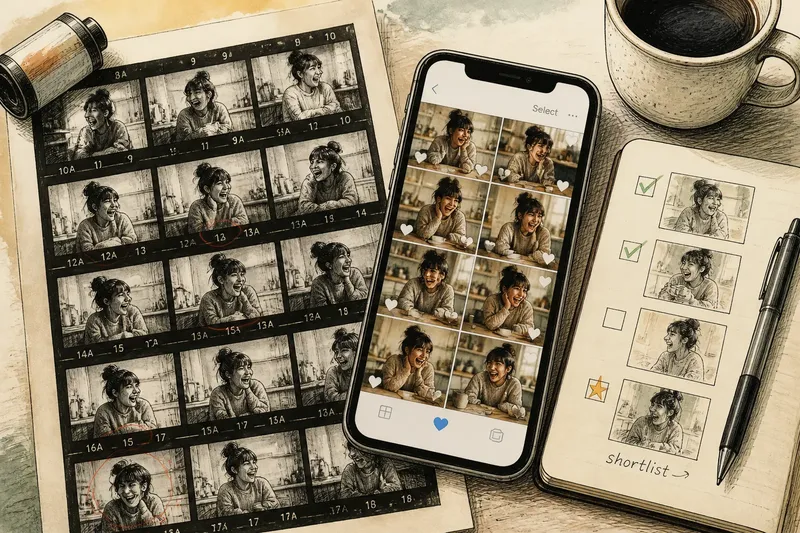
Choosing a photograph used to mean scanning a printed grid; now it often means swiping through a camera roll. The shift from film contact sheets to phone galleries has changed not only how quickly we review images, but what we notice and keep. A contact sheet made comparison unavoidable. A camera roll offers freedom, along with a steady stream of distractions.
Neither format is inherently better. The useful question is what kind of decision you need to make: find the strongest frame in a tightly related set, or decide which images deserve attention across a sprawling collection. Knowing how each approach shapes your eye can make phone photo selection more deliberate without turning it into a chore.
Film contact sheets made comparison the default
A contact sheet presents a roll of negatives as small, ordered images on one surface. Photographers could see the sequence at a glance: repeated attempts, changes in expression, a shifted gesture, or a frame that broke from the pattern. The point was not to admire every photograph separately. It was to compare neighbouring choices.
That arrangement brought a useful constraint. Images appeared in the order they were taken, and the whole batch occupied a limited area. A frame that looked promising on its own could seem less convincing beside a sharper, better-timed alternative. Conversely, a quiet image might stand out because it offered something the rest did not.
The contact sheet also separated selection from enlargement. Small previews were enough to identify likely keepers, but close inspection came later. That pause helped distinguish a photograph with a compelling idea from one that merely looked attractive at first glance. It suited assignments with a clear subject, such as a portrait sitting or a short sequence of street photographs, where the photographer wanted to select among related frames.
Phone camera rolls favour quick, local choices
A phone gallery replaces the single sheet with a flexible stream. You can enlarge a frame immediately, mark a favourite, compare images in an album, or jump to photographs from another day. That makes it easier to judge fine details and to revisit a picture outside the moment when it was taken.
The trade-off is that the whole collection is rarely visible at once. Swiping presents one image after another, so each frame can be judged in isolation. A familiar scene, a burst of near-identical portraits or a pleasing colour may keep attention longer than it deserves. Meanwhile, an image with a less obvious strength can be passed over before its neighbours reveal what makes it distinctive.
Phone galleries suit people who make photographs across many subjects and want to sort them in small pockets of time. A walk, a family gathering and a quick reference picture can all sit in the same roll. Albums and favourites help, but only if you use them with a consistent purpose rather than treating every attractive image as a keeper.
Three review approaches suit different kinds of selection
Compare a tight sequence when timing matters
Look at related frames together when the differences are small: a glance shifts, a hand moves, or someone steps into the light. On a phone, select a short run of images in the gallery or create a temporary album. Compare expression, gesture and background as a group, then keep the frame that best carries the moment rather than the one that simply looks most polished.
Review one image at a time when detail matters
For photographs where focus, text, or a small visual detail is central, open each likely candidate at a useful size. Check whether the intended subject reads clearly and whether an accidental distraction changes the meaning. This slower pass suits a photograph you may share or edit, but it is unnecessary for every casual image.
Make a later shortlist when the collection is mixed
If the roll contains unrelated subjects, avoid trying to make one sweeping ranking. Mark only the frames that have a clear reason to return to, then review that smaller group later. This separates discovery from final choice: the first pass catches possibilities, while the second asks which images still hold your attention once the immediate context has faded.
How should you choose a review method?
Should you delete as you photograph?
Remove an image immediately only when the decision is obvious, such as a duplicate you made by mistake. For close alternatives, wait until you can compare them together; deleting too early can erase the detail that would have helped you choose.
When should you use albums or favourites?
Use a favourite mark for images you genuinely want to revisit, and an album when a group has a shared purpose, such as a planned portrait edit. If every image receives the same mark, the marker stops helping you distinguish priorities.
How many near-identical frames should you keep?
Keep more than one when the images serve different purposes or preserve distinct expressions. If they make the same point, retain the one with the clearest subject and strongest moment, then let the rest go after a fair comparison.
Is a contact-sheet-style view possible on a phone?
Many gallery apps offer a grid, and a temporary album can collect a short sequence for side-by-side review. The small thumbnails are useful for spotting patterns, but open promising frames individually before making a final choice.
Choose by the decision, not by the device
Start by asking what you are selecting for. A single image for a family message needs a clear expression and a readable moment. A set for a personal project may need variety, visual continuity or a change in mood. Those aims call for different comparisons, even if the photographs came from the same phone.
Say you have a dozen photographs of a friend laughing at a kitchen table. First gather the frames into one temporary album. Scan the grid for changes in expression and posture, then open the strongest few to check that the eyes and gesture read well. Choose the image that communicates the moment most clearly; keep a second only if it captures a genuinely different beat.
For a mixed camera roll, use a light touch. Mark images that have a distinct subject, a useful memory or a reason to edit. Leave routine records alone unless they begin to crowd out photographs you care about. It is not worth building elaborate folder systems or labelling every ordinary snapshot; the sorting should make choices easier, not become another task to maintain.
Make selection a separate part of taking photographs
When a photograph is fresh, the memory of making it can influence the judgement: the walk was pleasant, the subject mattered, or the light felt special. A later review gives the image room to stand on its own. You do not need to wait a prescribed length of time; simply return when you can look at the frames without rushing to capture the next moment.
The move from film contact sheets to camera rolls has made reviewing more immediate and more flexible, but it has not removed the value of comparison. Use a grid for related frames, a close inspection for detail, and a shortlist for a mixed collection. For phone photo selection, the best method is the one that makes the decision visible: what this image says, what its alternatives say, and why one deserves to stay.