A Phone Camera Walk After Rain
A phone camera walk after rain turns puddles, wet leaves and softened light into simple photo opportunities, with a calm route and little editing needed.
A phone camera walk after rain works best when you follow the water rather than hunt for a grand view. Start on a familiar street, park path or courtyard while surfaces are still wet, and let reflections, softened light and small changes in texture guide your attention.
Keep the route short enough to pause without feeling you must cover ground. Your phone is already suited to close details and quick framing; the useful choice is often which scene to leave out. Look for a few different kinds of image, then stop when the light or your interest changes.
Where should you walk after rain?
Choose a route with safe, walkable pavements and a mix of surfaces: paving stones, shop windows, railings, leaves or a small patch of grass. A familiar loop makes it easier to notice what the rain has altered instead of spending the walk searching for somewhere impressive.
Check the weather and the ground before setting out. Avoid flooded paths, fast-moving water, slippery slopes and places where you would need to step into traffic to frame a shot. If the rain is still heavy, wait somewhere sheltered; there is no photograph worth taking a needless risk for.
Try a simple route with three pauses: a place with a puddle, a spot where water clings to plants or a fence, and a sheltered edge where the brighter sky is visible. You do not need to reach all three. The route is a prompt, not a quota.
What makes a puddle reflection work?
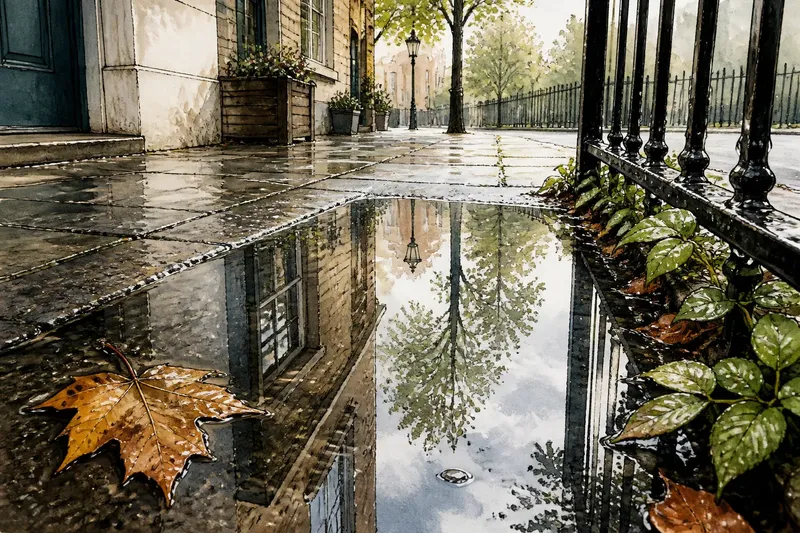
A reflection becomes easier to read when the water sits beside a recognisable shape: a doorway, a tree, a lamp or a strip of bright sky. Look for a puddle that holds one clear subject rather than a jumble of signs, feet and passing cars. Move only where the pavement is safe and keep your phone above the water.
Tap the reflected subject on screen if the phone has focused on nearby grit or a bright patch of sky. Then check the whole frame. A reflection can be more compelling when the edge of the puddle or a small piece of pavement remains visible, giving the viewer a clue that the image is turned upside down.
Say you find a shallow puddle beside a brick wall, with a window reflected across its surface. If the first frame includes a distracting bin, take a step along the pavement and frame the reflected window against the brick instead. The expected visible change is a cleaner shape in the water, not a different or more dramatic scene.
How can you photograph wet details without making them look busy?
Pick one detail and give it room. A bead of water on a leaf, a darkened wooden bench or a line of droplets on a railing can carry a frame if the background is quiet. Bring the phone closer only while the subject stays in focus; if it blurs, ease back and let the surroundings provide context.
Use the main camera first. It usually gives you a straightforward view and avoids the abrupt crop or perspective change that can come from switching lenses mid-walk. If your camera app offers a close-focus mode, use it only when the subject and background benefit from that tighter view. A small change in your stance may be enough.
Watch the edges before pressing the shutter. Bright litter, a cut-off shoe or a stray branch can pull attention away from the droplet or leaf. Reframe by turning slightly or lowering the phone; do not keep adding more subjects in the hope that the picture will feel richer.
Why does the light look softer after rain?
Cloud cover often spreads daylight across the scene, reducing the hard-edged shadows that can make wet surfaces look harsh. The pavement may also reflect a brighter patch of sky, while leaves and walls appear darker beside it. Notice these differences on screen and frame a manageable area rather than pointing at the brightest part of the sky.
When a scene looks washed out, tap a mid-tone area such as a wet wall or a leaf, then check whether the rest of the image still holds detail. Phone cameras may brighten or darken the frame automatically as you recompose. If the brightness shifts, pause and decide whether the main subject is still clear before taking another frame.
Rain can leave useful contrast even under a grey sky: a pale reflection against dark paving, or fresh green beside a muted fence. You do not need to wait for sunbeams. A patch of brighter sky reflected in water can serve as a highlight without turning the whole image into a search for dramatic light.
Which phone camera setting should you use?
For a casual walk, the default photo mode is usually the simplest starting point. Keep the lens clean with a soft cloth before you begin, since rain spots or fingerprints can soften highlights and make reflections look hazy. Avoid wiping the camera lens with a rough sleeve or anything gritty.
Use the standard photo ratio unless you have a clear reason to compose for a different crop. A wider frame can include the setting around a puddle; a closer view can isolate a small detail. Avoid digital zoom for a small subject when moving a little closer is safe and practical, but keep enough distance to avoid stepping into a wet or unstable area.
If your phone offers live photos, night mode or automatic scene adjustments, leave them as they are unless you know why you want to change them. The aim is to respond to what is in front of you, not to spend the walk moving through menus. Follow your phone maker’s instructions for camera features and any limits on using the device in wet conditions.
How many pictures should you take on the walk?
Take a few frames when a composition changes meaningfully, then move on. A slight shift can remove a distracting edge or place a reflection more clearly, but repeated shots from the same spot rarely add much. Check the screen for focus and framing, not for a perfect image that the scene may never offer.
It is also fine to leave a promising view unphotographed. Some reflections break as soon as a person walks by, and some small details are more enjoyable to notice than to record. What is not worth the effort is crouching over a puddle in an unsafe place or chasing a fleeting highlight through a crowded route.
What should you do with the pictures afterwards?
Choose images by asking what each one gives you: a clear reflection, an inviting texture or a small detail that holds attention. Keep the frames that have a distinct subject and remove obvious accidental shots. You do not need to keep every near-duplicate simply because the phone has room for it.
If an image needs a small correction, begin with a modest crop or a gentle brightness adjustment. Leave the colour close to what you remember seeing, especially in wet greenery and reflected light. The point of this walk is to notice the scene, so a heavy filter or a long editing session can work against its quiet character.
A phone camera walk after rain can be as simple as a loop around the block and a handful of deliberate frames. Next time, choose a different surface or look for a new kind of reflection; the same route can offer another view when the weather changes.